Fundwell
Optimizing advisor workflow increases finance industry client retention.
“Fundwell” Improving Financial Advisor’s Productivity through Automation Tools.

Project Overview
Problem

Losing Clients
“One in four clients would leave their financial advisor due to lack of personal connection”
━ Source: AIG Life & Retirement and MIT AgeLab, surveyed 2,000+ financial clients.
My Role & Methods
UX Researcher & UI Designer
-
Secondary Research
-
Primary Research (1: 1 interviews)
-
Synchronize Research Data
-
User Persona
-
Ideate & Sketch
-
Design & Prototype
-
Usability Tests
Objectives & Solution
Solution concept:
Improving Financial Advisor’s Productivity through automation tools.
Deliverable:
-
Wireframe design of a web based client portfolio management product.
-
Low fidelity prototypes for 2 MVP features.
Research

“29% of advisor time spend on Operational Activities ”
—Capgemini Analysis 2010; PWC Survey, 2009
Having a closer look at the work structure of a typical financial advisor, 1/3 of their work time is spent on Non-client facing activities.

#1 Failure to communicate on a timely basis - 72%
#2 Failure to understand the client's goals and objectives
#3 Failure to promptly return phone calls
#4 Poor investment performance
#5 Making claims they can't keep
Why clients left their advisors?
A recent survey conducted by Financial Advisor Magazine discovered the number one reason that causes clients leaving their financial advisor is advisors failed to communicate on a timely basis. Other major reasons discovered in the survey shows that client retention rate is closely tied to client facing activity.
What slows down financial advisors?
Time consuming tasks :
-
Collecting client reports from different sites
-
Manual data sorting
-
Manual data analysis
-
Manual data entry
-
Manually prioritize clients
-
Repetitive admin tasks
User Journey

Client expresses their financial concerns and areas of interest.
1. Meet Advisor
Client collects required documents and account information and passes to the advisor for creating plans and goals.
2. Collect Information and Create Goals
Manually review client information and check in with clients on their goal process.
3. Track Goals
Meet clients and evaluate their performance. Iterate goals and plans accordingly.
4. Review and Iterate
Planning
Tracking
Interview Insights - Affinity Map - What slow down financial advisors ?

Problems occured when collecting data using inefficient traditional system :
We discovered that inefficient system and tools caused major problem that slow down productivity. First, tools and data exist on different platforms. Advisors need to visit multiple sites to get information and reports. The information is unusable until financial advisors extract the useful data from the report and manually enter into a calculator. It requires so much time and work already before the actual planning. The situation gets worse when clients submit paper documents. Not only it takes extra time for digitalizing paper data, sometimes clients even bring in the wrong type of document or incomplete document.
Problems occured when tracking client progress using traditional system :
The wealth management process does not end after the plan is made. Advisors have go through the same time consuming process to get updated information in order to track client’s financial goal progress. While advisors can only get through so many clients a day, some clients can easily deviate from their goals due to lack of communication and connection with their advisors.
Design Ideation
Who are we designing for?
User Persona
.png)
How might we provide correct and up-to-date information for financial advisors so that they can better help client succeed in their financial goals?
Solution concept:
Improving Financial Advisor’s Productivity through automation tools.
User Flow - Edit Budget Goal

User Flow - Create Budget Goal

low-fidelity Design & Test Findings
Problem in Planning

Error Proneness
Error proneness in traditional paper system brings incorrect information.
Scattered Information
Information are scattered across different platforms.
- Key Feature 01 -
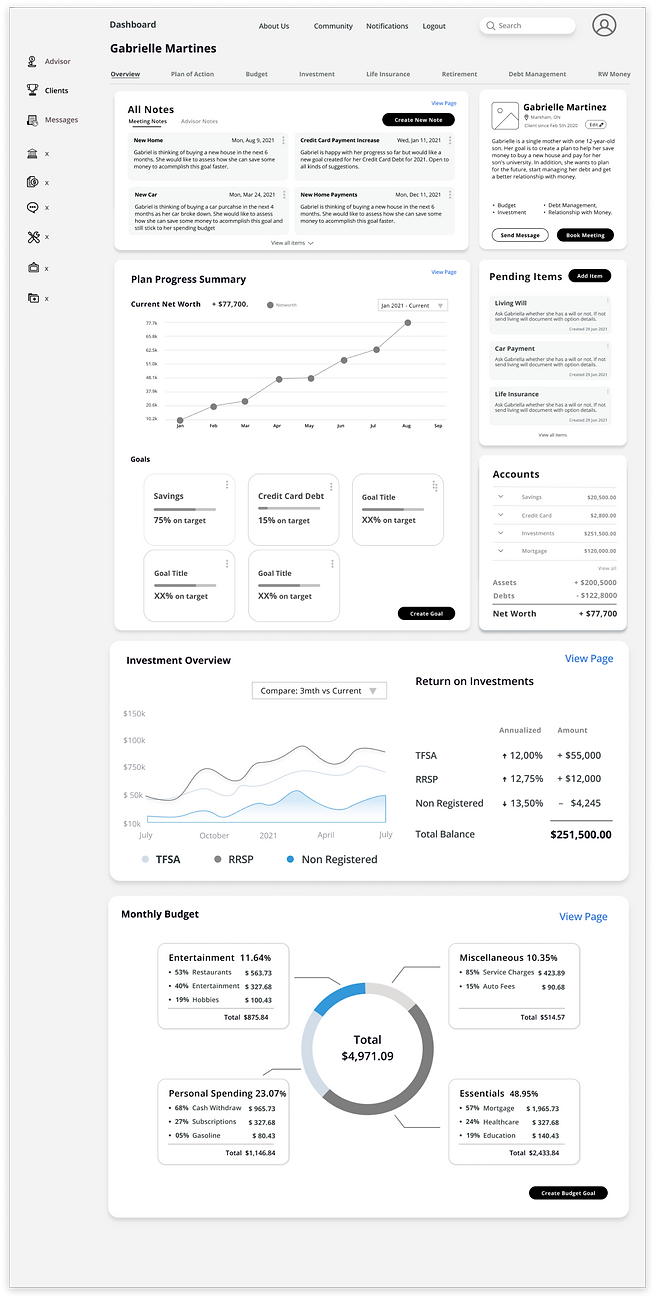
API integrated Customer Relation Management (CRM) Dashboard
Without accurate client data, good decisions and financial plans cannot be made.
Sometimes advisors are given incorrect data because clients misinterpretated the data or didn’t know how to collect the data. Intergrating API in to a CRM system will automize importing acurate and up-to date accounts information for advisors.
Learning from expert interviews and by researching competitors in the market, we discovered the essential data that financial advisors needs when making plans for their client :
User Story:
As Robyn, I want to be able to see client's goal progress and portfolio summary at one glance.
Essential elements advisors need:
-
Client Plan Progress Summary
-
Client goals and goal progress
-
Client Account information
-
Client monthly spending
-
Client Cashflow
-
Client Investment performance
Low Fidelity Screen Design - Advisor Dashboard
.png)
Guerilla Test
We conducted guerilla tests to five novice users. The goal is to discover potential usability problems in UI and make sure the product is adaptable. Although the product is marketed to financial advisors (expert), it should be easy enough for novice users, so that even a beginner financial advisor can use the project.

Poor Visual Hierarchy
Can’t find the information, and tasks that needs to be prioritized.

Design Iteration - Edit Client Budget goal
Version 1
.png)

Version 2
Inefficient Collaboration
Traditional system takes lots steps when modifying client’s goals. There is also no efficient way to communicate with clients about changes on their current goals.
- Key Feature 02 -
Goal Modifier
Show clients the changes with clear visuals and data. Present comparison diagram of before and after to align client’s understanding on the updated goals.
User Story:
As Robyn, I want to be able to modify client's current financial goals and get their consent about the changes within a few clicks.
Low Fidelity Screen Design - Goal Modifier

1
Client goal overview
2
Propose new goals
3
updated client goals
Missed call to action button
Users did not notice the call to action button because the placement is far out, and the size is small. The size and the contrast of the buttons need to be increased across the board.
Confusing pre-filled information
Users were confused by the pre-filled numbers in the boxes. Those numbers were there to provide a reference point. However, users saw it as the number that they should put down.
Design Iteration - Edit Client Budget goal
Version 1
Version 2

Design Iteration - Propose New Goals
Version 1

Version 2

Problem in Tracking
Took too much time to find out who needs attention first.
Advisors needs to go through the hassle of collecting data and pull reports to only find out which client needs immediate help.
- Key Feature 03 -
Prioritized Client List
Integrating API in to a CRM system will automate account information updates, and reflect accurate goal progress.
An auto-prioritized client list will help advisors stay connected with those who needs attention or is already behind their goals.
User Story:
As Robyn, I want to be able to know when the client is deviating from their goal.
Low Fidelity Screen Design - Prioritized Client List

Confusing Labels
Users weren’t sure what “Priority Contact” and “Contact Period”means.
Design Iteration - Prioritized Client List
Version 1

Version 2

Note

This project is still in progress. Stakeholder will continue to work with future teams on completing the advisor dashboard. Once iterations are made based on Guerilla test feedback, the team should test 5 expert users to find out how financial advisors would use this product in their work, and if time on task is improved.